A UX project can look organized in Figma and still break during execution. The prototype may be clean, the research plan may be ready, and the design direction may look right. But if the wrong people are involved, or nobody knows who approves what, the project will slow down fast.
That is when conflicting feedback appears. Research findings get ignored. Prototype reviews turn into opinion battles. Developers raise constraints too late. Founders, product managers, engineers, support teams, and end users all see the project from different angles, and those angles need to be mapped early.
Stakeholder mapping in UX design helps teams identify who influences the project, who is affected by the outcome, who should join UX research, who needs updates, and who can approve or block design decisions.
A strong stakeholder map keeps user needs, business goals, technical constraints, and stakeholder expectations aligned before design decisions become expensive to change.
Stakeholder mapping in UX design is the process of identifying the people and groups who can influence or be affected by a UX project, then organizing them by power, interest, role, attitude, and communication needs. It gives UX teams a clear view of who should be involved, who needs updates, and who can affect design decisions before the project slows down.
A UX stakeholder map is not just a diagram. It should guide UX research, stakeholder interviews, design reviews, prototype approval, communication planning, and developer handoff. Without that action layer, the map becomes a workshop artifact instead of a useful project tool.
Good stakeholder analysis helps teams understand who has decision-making power, who has useful user or business knowledge, and who can block or accelerate progress. A product manager may shape feature priorities.
An engineering lead may define technical constraints. Customer support may bring repeated user pain points. End users may reveal where the experience actually breaks.
Stakeholder mapping also clarifies who needs to review wireframes or prototypes, who should receive research findings, who needs milestone updates, and who should be involved before handoff.
When power and interest are mapped clearly, UX teams can involve the right people without turning every decision into a crowded meeting.
Stakeholder mapping and stakeholder analysis are closely related, but they are not the same thing. In a UX project, analysis usually comes first. Mapping comes after the team has enough information to organize stakeholders in a useful way.
Stakeholder analysis is the research process. It helps UX teams identify who the stakeholders are, what they care about, what goals they have, what concerns they may raise, how much influence they hold, and what risks they can create for the project.
This is where the team learns why a product manager, founder, engineering lead, customer support team, or end user matters to the UX process.
Stakeholder mapping turns that research into a visual and practical tool. The team may place stakeholders in a power-interest matrix, stakeholder circle, RACI chart, or relationship map. The point is not just to visualize people. The point is to decide how to engage them.
UX teams need both. Understanding stakeholders without acting on that understanding is not enough. A good stakeholder map turns analysis into a communication and engagement plan, showing who needs interviews, who needs updates, who reviews prototypes, and who approves key design decisions.
A stakeholder map is useful because it turns scattered opinions into a clear working plan. Instead of treating every comment with the same weight, the UX team can see which input affects strategy, which affects usability, which affects feasibility, and which affects approval.
That matters during UX research. Before interviews or usability testing begin, the team can identify who should contribute business context, who can explain user complaints, and who can flag product or technical constraints. This keeps research focused instead of disconnected from the realities of the product.
It also protects design decisions from becoming opinion battles. When wireframes or prototypes are reviewed, the team can point back to user needs, project goals, and agreed decision ownership.
A founder may care about activation. A product manager may care about roadmap fit. An engineering lead may care about build effort. Mapping these priorities early helps the team compare feedback instead of reacting to whoever speaks the loudest.
Stakeholder mapping also reduces late-stage rework. It clarifies who approves wireframes, who reviews prototypes, who signs off on the final UI, and who only needs milestone updates. That prevents hidden decision-makers from appearing after the design direction is already set.
By the time the project reaches developer handoff, the UX team has already accounted for business goals, user needs, technical constraints, and stakeholder expectations. That makes the final design easier to defend, easier to build, and easier to connect to outcomes like conversion, adoption, retention, support reduction, or faster task completion.
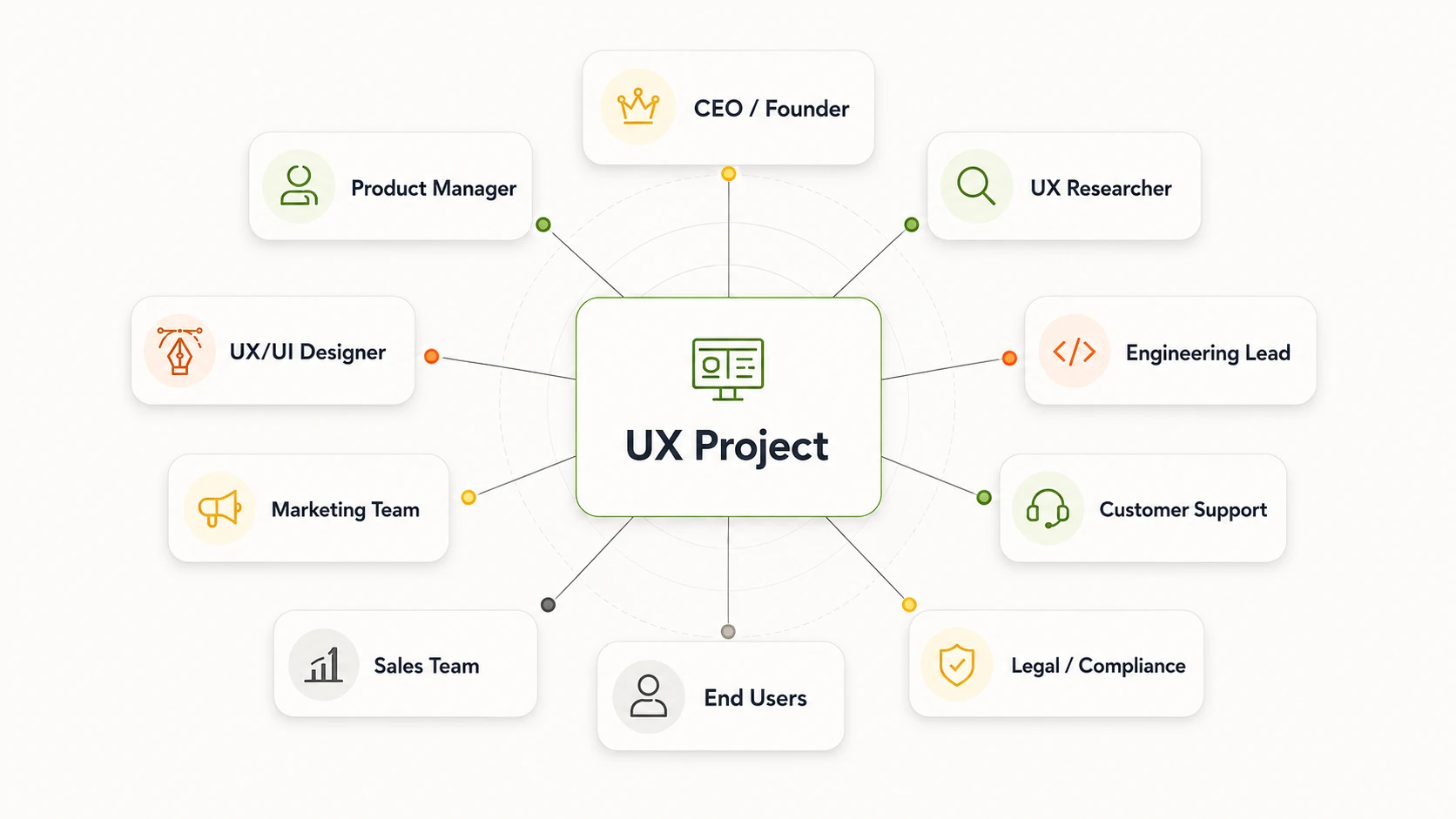
In a UX project, the loudest voice in the meeting is not always the most important stakeholder. Some people control budget, some control scope, some understand technical limits, and others carry the clearest view of user pain.
That is why UX teams need to look beyond executives and clients. Stakeholders can include product teams, researchers, designers, engineers, sales, support, legal teams, and end users.
Each group sees a different part of the product experience, and missing one of them can lead to weak decisions later.
End users are stakeholders even if they do not have internal decision power. They validate whether the experience actually works.
Customer support and sales teams are also important because they hear user pain points, objections, and adoption barriers early. Engineering stakeholders prevent unrealistic design decisions by flagging feasibility issues before handoff.
Legal and compliance teams should be involved early too, because privacy, accessibility, or regulatory concerns can block a design late in the process.
After listing the people involved, the next step is to classify them. This keeps the stakeholder map from becoming a flat list of names and helps the UX team decide how each group should be involved.
Internal stakeholders are people inside the organization who shape the project from the business, product, design, or delivery side. External stakeholders sit outside the core team but still affect adoption, usability, compliance, or market fit.
Direct stakeholders are actively involved in the work. Indirect stakeholders may not join meetings every week, but the final experience still affects them.
A stakeholder can belong to more than one category. For example, an enterprise client may be both external and direct if they join product reviews. End users are usually external, but they become direct stakeholders when they participate in user interviews or usability testing.
This classification should lead to better engagement, not just cleaner labels. A senior executive may need concise milestone updates, while a customer support lead may need deeper involvement during discovery. A regulator may not join design reviews, but ignoring compliance requirements can block launch.
UX teams should avoid mapping only senior internal stakeholders. That creates a business-heavy view of the project and misses the people closest to user needs, technical constraints, and real product adoption.
The best time to create a stakeholder map is before the UX team starts making major decisions. If the map is created after research is finished or after prototypes are approved, it is already late.
By then, hidden decision-makers, technical limits, and conflicting business priorities may have already shaped the project.
Stakeholder mapping is most useful during discovery or research planning, but it should stay active throughout the project.
Use stakeholder mapping when:
The earlier the team creates the map, the easier it becomes to plan research, define approval paths, and involve the right people at the right time. For example, customer support may need to be interviewed before user testing.
Engineering may need to review feasibility before a prototype is presented. Legal or compliance may need early visibility if the product handles sensitive data.
The map should not be treated as a one-time document. Stakeholder influence changes as the project moves forward. A person with low interest during discovery may become critical during approval. A technical lead may become more important before handoff. A new executive sponsor may change the decision path.
Update the stakeholder map whenever scope, budget, team ownership, timeline, compliance risk, or approval paths change. That keeps the UX process aligned instead of relying on assumptions from the start of the project.
Not every UX project needs the same kind of stakeholder map. A small website redesign may only need a simple power-interest matrix.
A complex SaaS product, healthcare platform, fintech app, or enterprise dashboard may need multiple models to show influence, responsibility, proximity, and approval paths.
Most UX teams can start with the power-interest matrix because it answers the first practical question: who needs close involvement, and who only needs updates?
But that model does not explain everything. It may not show who is closest to the project, who owns delivery, or who influences decisions behind the scenes.
That is why UX teams should choose the model based on the decision they need to make.
The stakeholder circle is useful during discovery because it helps the team see who is closest to the project and who is indirectly affected. For example, a product manager and UX researcher may sit close to the work, while end users, partners, or regulators may sit further out but still matter.
A RACI chart is more useful during execution and developer handoff. It clarifies who is responsible for tasks, who is accountable for final approval, who must be consulted, and who only needs to be informed.
Relationship maps are useful when approval paths or internal politics are unclear. They help the UX team understand who influences whom, where resistance may come from, and which stakeholders can help move decisions forward.
A stakeholder mapping case study also frames stakeholder mapping as a way to understand relationships and connect UX activity to project and business outcomes, not just classify people by influence and interest.
That matters for UX teams because design decisions often need to satisfy user needs, business goals, delivery constraints, and stakeholder expectations at the same time.
For most UX teams, the power-interest matrix is the easiest model to start with. It helps the team sort stakeholders by two practical questions: how much influence do they have, and how much do they care about the project?
Power means the stakeholder’s ability to approve, block, fund, redirect, or slow down the UX project. A founder, product owner, compliance lead, or engineering head may have high power because their decision can change the project direction.
Interest means how closely the stakeholder cares about the project or how strongly they are affected by the outcome. Customer support, UX researchers, and end users may have high interest because they deal directly with user problems, even if they do not control the final approval.

The biggest mistake is confusing loudness with power. The person giving the most feedback in a design review may not be the person who controls budget, scope, or approval. The matrix helps UX teams separate noise from actual decision authority.
Low-power, high-interest stakeholders still matter. Customer support may not approve the final UI, but they can reveal repeated user pain points. End users may not sit in planning meetings, but usability testing with them can expose problems internal teams missed.
High-power, low-interest stakeholders need careful handling too. They may not attend every prototype review, but they can still block progress if the project creates budget, compliance, brand, or technical risk.
The matrix should always lead to a stakeholder engagement plan. Otherwise, it is just a chart. The real value is knowing who to manage closely, who to update, who to consult, and who to involve before key UX decisions are made.
The matrix is only useful when the team knows how to build it from real project information. Guessing where people belong creates a false sense of alignment.
A useful UX stakeholder map should come from discovery, stakeholder interviews, project constraints, and the decisions the team needs to make.

Start by clarifying what the UX project is trying to achieve. A stakeholder map for a SaaS dashboard redesign will look different from one for a mobile banking app, a healthcare portal, or a website conversion project.
Define the project type, scope, timeline, success metrics, and major decision points. For example, is the goal to improve activation, reduce support tickets, increase conversion, simplify onboarding, or improve task completion? These goals shape which stakeholders matter most.
Also identify where decisions will happen. The team should know who approves research direction, wireframes, prototypes, final UI, and developer handoff before the project moves too far.
Next, list everyone who can influence the UX project or be affected by the outcome. Do not stop with executives and product managers.
Include business stakeholders, product stakeholders, technical stakeholders, user-facing teams, end users, and external stakeholders.
That may include founders, product managers, product owners, UX researchers, designers, engineering leads, developers, marketing, sales, customer support, legal, compliance, clients, vendors, partners, and user groups.
The goal is not to invite everyone into every meeting. The goal is to avoid missing people whose input, approval, or constraints could affect the project later.
Once the list is ready, analyze each stakeholder. Power and interest are the baseline, but UX teams should go deeper for complex projects.
Power means the ability to approve, block, fund, redirect, or delay the project. Interest means how closely the stakeholder cares about the work or is affected by the outcome.
Attitude shows whether they are supportive, neutral, skeptical, or resistant. Urgency shows how quickly their needs must be addressed. Proximity shows how close they are to the project or user problem.
Also document each stakeholder’s goals, concerns, communication needs, and decision authority. A product manager may have high interest and high influence over scope. An engineering lead may have strong authority over feasibility.
Customer support may have lower decision power but strong proximity to user pain. Legal may have low daily involvement but high blocking power near launch.
After analysis, choose the model that helps the team make the next decision.
Use a power-interest matrix when you need to decide who to manage closely, keep satisfied, keep informed, or monitor. Use a stakeholder circle when you need to understand who is internal, external, direct, or indirect.
Use a RACI chart when responsibility and approval are unclear. Use a relationship map when influence networks or approval politics are hard to see.
For many UX projects, a team may use more than one model. For example, the stakeholder circle may help during discovery, while a RACI chart may become more useful before developer handoff.
The stakeholder map should lead to action. For each group, decide how they should be involved.
Some stakeholders need interviews during discovery. Some should join design workshops. Some need research readouts after user interviews or usability testing.
Some should review wireframes or prototypes at specific milestones. Some only need short progress updates. Others must be included in approval checkpoints before development begins.
This is where the map becomes a stakeholder engagement plan. It defines who needs what information, when they need it, and how deeply they should be involved.
A stakeholder map is not finished after the first workshop. Stakeholder influence changes as the project changes.
Update the map when scope, budget, timeline, team ownership, technical constraints, compliance requirements, or approval paths change. A stakeholder who had low interest during discovery may become important during prototype review.
An engineering lead may become more influential during handoff. A new executive sponsor may change final approval.
Treat the stakeholder map as a working project tool. When it stays current, it helps the UX team manage research, design decisions, stakeholder communication, and handoff without relying on outdated assumptions.
A UX stakeholder mapping template helps the team capture the right details before placing people on a map. Without this step, the map can become guesswork: someone gets labeled “high power” or “low interest” without a clear reason.
Fill this template during discovery, then validate it through stakeholder interviews. A product manager may explain roadmap priorities, an engineering lead may reveal technical constraints, customer support may share repeated user pain points, and legal may flag risks that affect approval.
That information should feed both the stakeholder map and the stakeholder engagement plan.
This template should not be treated as a static spreadsheet. Update it when the project scope changes, a new decision-maker appears, budget shifts, technical constraints become clearer, or the team moves from research to prototype review and developer handoff.
Imagine a SaaS company redesigning its analytics dashboard. Users are struggling to find key data, support tickets about reporting have increased, and leadership wants better product adoption.
The UX team cannot solve this by only redesigning charts and filters. They need to understand who influences the dashboard, who depends on it, and who can approve or block changes.
In this case, stakeholder mapping helps the team separate decision-makers from contributors, research participants, and approval stakeholders.
The founder and product manager need to be managed closely because they control direction, priorities, and approval. They should be involved during discovery alignment, research readouts, and major prototype reviews. That does not mean they need to comment on every small UI detail, but they do need enough context to make informed decisions.
Customer support should be interviewed early because they already know where users struggle. Their ticket history can reveal repeated problems, confusing terminology, missing dashboard data, or workflows that create frustration. Sales may also be worth adding if enterprise customers often request specific reporting features.
End users should be involved through usability testing. They may have low internal power, but they have high interest because the dashboard affects their daily tasks.
Their feedback can show whether users can find reports, understand metrics, complete actions, and trust the data shown in the interface.
The engineering lead needs prototype and handoff reviews. Without early feasibility input, the UX team may design dashboard interactions, filtering logic, or data visualizations that are expensive or unrealistic to build within the timeline.
Legal or compliance may not need weekly design meetings, but they need concise updates if the dashboard includes sensitive customer data, financial information, permissions, or export features. Ignoring them until final approval can delay launch.
This stakeholder map prevents rework by making involvement intentional. The right people are interviewed before design starts, the right users test the prototype, decision-makers review at agreed milestones, and technical or compliance risks are handled before developer handoff.
Before a stakeholder map is finalized, UX teams need to understand what each stakeholder actually wants, worries about, and controls. That is where stakeholder interviews help.
They reveal goals, expectations, constraints, risks, approval paths, and hidden influence before those issues turn into blockers.
These interviews are especially useful during discovery. Speak with executives, product leads, support teams, sales, engineers, clients, and compliance stakeholders where relevant. Each group can expose a different part of the project context.
Do not confuse stakeholder interviews with user research. Stakeholder interviews explain the business, product, technical, and organizational context around the UX project.
User research explains user behavior, needs, pain points, and task success. UX teams need both, but they answer different questions.
The answers should feed directly into the stakeholder map. If one person controls final approval, they should not be treated the same as someone who only needs updates.
If customer support keeps mentioning the same usability issue, that insight should shape the research plan. If engineering sees a major feasibility risk, the UX team should address it before prototype approval.
Good stakeholder interviews make mapping more accurate. They also help the team build an engagement plan based on real needs, not assumptions.
Once stakeholders are mapped, the next job is to decide how to work with them. The map should change how the UX team communicates, who joins research activities, who reviews design decisions, and who approves key milestones. If it does not change the way the project is managed, it is just a chart.
The goal is not to invite everyone to every meeting. That usually creates slower decisions, repeated feedback, and design-by-committee.
Engagement should match each stakeholder’s power, interest, communication need, and level of involvement in the UX project.
High-power stakeholders need clarity and confidence, not excessive detail. A founder, executive sponsor, or product owner may not need to see every research note, but they do need to understand the direction, risks, trade-offs, and approval points.
High-interest contributors need visibility and context. UX researchers, customer support, sales, and product teams may not control final approval, but their knowledge can improve research planning, usability testing, and design decisions. Keeping them informed helps the UX team avoid missing important user or business context.
Low-interest stakeholders should not be ignored, but they also should not consume project time unnecessarily. A short milestone update may be enough unless their role changes or a risk appears.
Resistant stakeholders need special handling. Ignoring them is lazy and risky. Find out what they are worried about: budget, feasibility, compliance, brand risk, timeline, or loss of control.
Then respond with evidence, such as user research clips, usability findings, prototype results, or a clear risk comparison.
A strong stakeholder engagement plan keeps the UX process focused. The right people get the right information at the right time, and the team avoids both under-communication and unnecessary meetings.
UX research gets weaker when the team starts with the wrong assumptions or interviews the wrong people. Stakeholder mapping helps fix that before research begins.
It shows who has customer knowledge, who understands business constraints, who controls access to users, and who needs to approve the research plan.
This is useful during discovery. A product manager can explain roadmap priorities. Customer support can point to repeated complaints. Sales can share buyer objections
An engineering lead can flag technical limits that may affect what can be tested. Legal or compliance can identify restrictions around data, privacy, or participant recruitment.
Stakeholder mapping also helps UX teams find the right internal interview participants. Not every stakeholder needs a long interview, but the team should speak with people who have decision power, user knowledge, technical context, or approval responsibility.
These conversations reveal assumptions and constraints before the team invests time in user interviews or usability testing.
It can also improve access to the right user groups. In many projects, UX researchers need help from customer success, sales, account managers, or product teams to recruit participants. A stakeholder map shows who can open that access and who needs to be informed before recruitment starts.
The bigger benefit is buy-in. When stakeholders are involved early, they are more likely to trust the research process and pay attention to the findings. Research readouts become easier because stakeholders already understand why the study was run, which questions it answered, and how the findings connect to business goals and user needs.
Stakeholder mapping also reduces opinion-based design debates. Instead of arguing from personal preference during wireframe or prototype reviews, the team can point to evidence from user interviews, usability testing sessions, and research synthesis.
That makes design rationale stronger and helps the team defend decisions without turning every review into a subjective debate.
UX work becomes easier to measure when the team agrees on what success should look like. Stakeholder mapping helps surface those expectations early, before research findings, wireframes, or prototypes are judged by conflicting priorities.
Different stakeholders often define success in different ways. A CEO may care about revenue growth, positioning, or faster launch. A product manager may care about activation, adoption, and roadmap progress.
Customer support may want fewer repeated tickets. Engineering may want cleaner implementation and less rework. End users care about completing tasks with less effort.
Without mapping these expectations, UX teams can end up defending design decisions against unclear standards. One stakeholder may judge a flow by conversion.
Another may judge it by development effort. Another may judge it by customer complaints. Stakeholder mapping makes those success criteria visible before the design direction is locked.
It also helps the team choose better metrics. Depending on the project, success may be measured through conversion, activation, retention, adoption, task completion, support ticket reduction, user satisfaction, or development efficiency.
Stakeholder mapping does not create ROI on its own. Its role is to connect UX decisions to the outcomes stakeholders already care about. For example, if a SaaS onboarding redesign is judged by activation, the UX team can focus on reducing setup friction. If the goal is fewer support tickets, the team may prioritize clearer labels, stronger empty states, or better in-product guidance.
The practical benefit is alignment. When stakeholders agree on success early, UX teams face less rework, fewer delayed decisions, and fewer late-stage objections. Each recommendation becomes easier to explain: this user need supports this design decision, and this design decision supports an agreed business outcome.
Stakeholder mapping fails when teams treat it as a workshop activity instead of a working part of the UX process. The map should influence research planning, prototype reviews, stakeholder updates, approval checkpoints, and developer handoff. If it does not change how the team works, it is not doing its job.
Executives and product leaders are important, but they do not show the full project reality. If the UX team only maps senior decision-makers, it misses people closer to user pain and delivery constraints: customer support, sales, UX researchers, engineers, implementation teams, and end users.
A stakeholder map should change as the project changes. Stakeholder power and interest may shift when scope expands, budget changes, a new executive sponsor appears, or the project moves from research to delivery. Review the map at major milestones instead of assuming the first version is still accurate.
The person giving the most feedback is not always the person with real decision authority. A loud stakeholder may influence conversations but not control budget, scope, or approval.
A quiet legal, compliance, or engineering stakeholder may carry more blocking power than the team realizes.
Stakeholder alignment does not mean every stakeholder joins every meeting. That creates design-by-committee and slows the work.
Some stakeholders need deep involvement. Others only need concise updates, research summaries, or approval checkpoints.
Resistance usually points to an unresolved concern. It may be about feasibility, budget, timeline, compliance, brand risk, or loss of control. Ignoring resistant stakeholders lets those concerns grow in the background.
A better approach is to identify the concern early and respond with evidence from UX research, usability testing, or risk analysis.
A stakeholder map without a communication plan is just a static diagram. The team still needs to define who receives research findings, who joins workshops, who reviews wireframes, who approves prototypes, and who gets milestone updates.
End users may not control internal decisions, but they are directly affected by the outcome. If users are missing from the stakeholder map, the UX process becomes too business-centered and loses sight of usability, task completion, and real product adoption.
Engineering stakeholders help the team understand feasibility, system constraints, edge cases, and development effort. If they are involved too late, the UX team may create flows or interactions that are difficult to build within scope.
The biggest mistake is mapping people but not changing how the team communicates or makes decisions. A useful stakeholder map should shape the project from discovery to handoff.
At Musemind, stakeholder mapping is used to reduce ambiguity before it turns into rework. The goal is simple: make sure the right people are involved at the right stage, without turning every UX decision into a group debate.
During discovery, we identify business, product, technical, and user-side stakeholders. That usually includes founders, product managers, product owners, UX researchers, designers, engineering leads, customer-facing teams, and end users when possible. This helps us understand who shapes the project, who owns decisions, and who may be affected by the final experience.
During research, we separate decision-makers from contributors and research participants. A founder or product owner may approve the direction. Customer support or sales may provide context about user pain points. End users may participate in interviews or usability testing. Each group has a different role, so they should not be involved in the same way.
During UX strategy, we align stakeholder goals with user needs and business outcomes. If leadership wants higher activation, users need a simpler flow, and engineering needs a buildable solution, those priorities need to be visible before design starts.
During design, key stakeholders are involved at milestone reviews, not every small design decision. This keeps feedback focused and prevents design-by-committee. Stakeholders see the research logic, wireframes, prototypes, and design rationale when their input matters most.
During testing, usability findings help reduce opinion-based debates. Instead of arguing from personal preference, the team can review where users struggled, what evidence supports the change, and what should happen next.
During handoff, we align product owners and developers around feasibility, specs, priorities, and edge cases. This helps the final design move into development with fewer surprises.
Stakeholder mapping is not just a matrix. It only works when it changes how the UX team plans research, communicates findings, reviews designs, manages approvals, and prepares for handoff.
A strong stakeholder map shows who to involve, who to update, who can block progress, whose insight matters, and who owns key decisions. More importantly, it helps the team balance user needs with business goals before misalignment turns into rework.
The map is not the outcome. Better decisions are.
These quick answers cover the most common questions UX teams have about stakeholder mapping, from timing and research use to approval planning and tools:
Yes. End users are stakeholders because they are directly affected by the product experience. They may not control budget or approval, but their feedback shows whether the design is usable, useful, and aligned with real tasks. Ignoring them makes the UX process too internal and weakens user-centered design.
A power-interest matrix groups stakeholders by influence and involvement. Power means their ability to approve, block, fund, or redirect the project. Interest means how closely they care about the outcome. The four groups are manage closely, keep satisfied, keep informed, and monitor.
UX teams should create a stakeholder map during discovery or before UX research starts. This helps identify decision-makers, contributors, users, technical constraints, and approval paths early. Update it when scope, ownership, budget, timeline, or decision authority changes.
Review the stakeholder map at major project milestones: after discovery, before prototype review, before design handoff, or when new stakeholders appear. It should stay active as the project changes, not sit as a static planning file.
Stakeholder mapping improves UX research by showing who can provide internal context, who should be interviewed, who can help recruit users, and who needs to approve the research plan. It also builds buy-in, making research findings easier to communicate and defend.
It clarifies who approves what, when they need to review it, and what evidence they need. This prevents hidden decision-makers from appearing late and helps UX teams plan research readouts, prototype reviews, and approval checkpoints earlier.
UX teams can use Miro, Mural, FigJam, or Figma for visual mapping. Notion, spreadsheets, and whiteboards also work for documentation. The tool matters less than the quality of the stakeholder analysis, communication plan, and engagement decisions.




A digital transformation agency bringing strategy, design, and development together to build useful digital products for ambitious businesses.