AI in UX design 2026 is not about replacing designers completely. It is about replacing the low-context parts of UX work: first drafts, layout variations, UI copy, research summaries, simple prototypes, and repetitive production tasks.
A junior UX designer recently asked a question many designers are quietly thinking: if AI can generate wireframes, write copy, summarize research, and create prototypes, what is left for me?
The honest answer is simple. AI is not removing UX design. It is removing the parts of UX work that were never strategic in the first place.
Designers are already using AI heavily. The State of AI Design 2026 report found that 91% of designers use AI at least weekly, and 75% use it daily.
At Musemind, we see AI as a workflow accelerator, not a replacement for UX judgment. AI can speed up research, wireframing, prototyping, design QA, and handoff. But it still cannot replace user understanding, accessibility judgment, brand thinking, product strategy, or final design decisions.
So the real shift is not human designers versus AI.
It is execution-only designers versus AI-fluent UX thinkers.
In this guide, we’ll break down what AI is changing in UX design, where it helps, where it fails, which designers are most at risk, and what skills will matter most in 2026.
“AI replacing designers” does not mean every UX designer disappears. It means AI is moving into the repetitive, first-draft, and low-context parts of the UX design process.
That includes research summaries, wireframe ideas, UI copy, prototype drafts, design QA, accessibility checks, documentation, code generation, and developer handoff.
The State of AI Design 2026 report says AI is now used across the design workflow, including ideation, prototyping, UI copy, code generation, documentation, design QA, and developer handoff. 50% of surveyed designers said they had already shipped AI-generated code to production.
So yes, AI is replacing some design tasks.
But replacing tasks is not the same as replacing UX designers.
A UX designer’s real value is not just making screens. It is understanding users, structuring flows, making tradeoffs, protecting usability, thinking through edge cases, and deciding what should actually ship.
The role is also expanding. 65% of designers say they are doing more work that overlaps with product management, engineering, or design engineering. At the same time, 40% say PMs and engineers are doing more design work.
That means UX work is becoming less protected. More people can now do basic design tasks. And UX designers are expected to do more than before.
73% of designers say expectations are rising, with 45% pointing to faster turnaround times and 37% pointing to higher output volume.
At Musemind, we see this shift as a workflow change, not a death sentence for UX designers. AI can speed up the draft, but it cannot replace the reasoning behind the flow. A screen is not UX by itself.
UX still depends on user context, product constraints, business goals, accessibility, and judgment. So the real risk is not “AI replaces all designers.”
UX designers are not using AI only for inspiration anymore. They are using it across the workflow, from research synthesis to wireframing, UI copy, prototyping, design QA, accessibility checks, and developer handoff.
That is why AI in UX design 2026 is not just about faster visuals. It is about faster movement through the full product design process.
The biggest growth areas in AI-assisted design include code generation, wireframing, design systems, UI copy, design QA, accessibility, and developer handoff. That means AI is moving from an “idea tool” to a production and workflow tool.
At Musemind, this is where AI is most useful: not as the final designer, but as the first-pass assistant. It can summarize messy research notes, draft interface copy, suggest layout directions, and help catch consistency issues. But the UX designer still has to decide what reflects the user’s real problem.
Canva’s State of Visual Communication report shows why this matters beyond UX teams. Design-led organizations perform better in clear communication, brand cohesion, and brand differentiation. But the same report says the average company now uses 8.7 visual tools, which creates tool overload.
Adobe’s Digital Trends report also found that 76% of organizations saw GenAI increase content volume, and 69% reported improved employee productivity.
So yes, AI helps UX designers move faster. But faster does not automatically mean better.
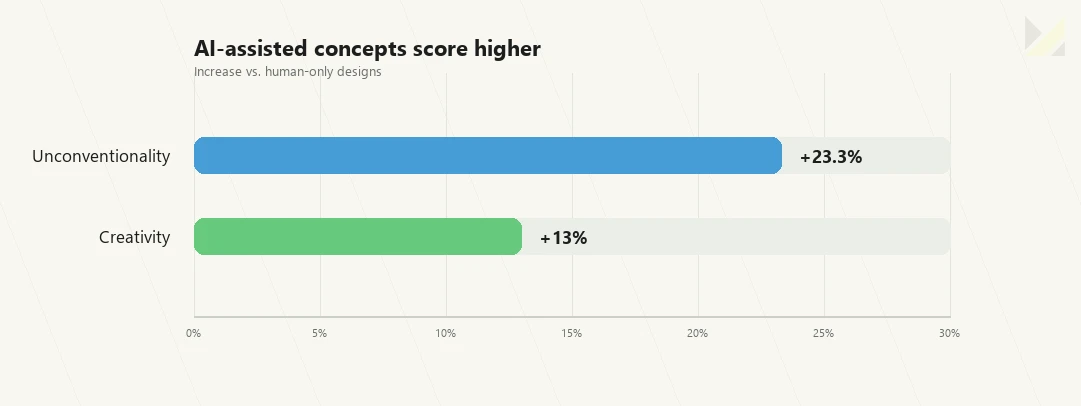
A 2024 arXiv preprint, which has not yet been peer reviewed, found that AI-supported designs were rated 13% more creative and 23.3% more unconventional, but not significantly better in usefulness, visual appeal, or brand alignment.
That is the practical rule for UX teams: Use AI to move faster through the workflow. But keep humans responsible for usability, context, accessibility, brand fit, and final product judgment.
AI works best when the task is repeatable, pattern-based, or first-draft heavy.
That is why it fits many execution-heavy parts of UX design: research summaries, UI copy, layout variations, wireframes, accessibility checks, design QA, documentation, prototype drafts, and front-end code.
The clearest shift is speed. In the State of AI Design 2026 report, AI use grew fastest in code generation, wireframing, design systems, UI copy, design QA/accessibility, design A/B testing and developer handoff. The same report says 50% of surveyed designers have shipped AI-generated code to production.
At Musemind, we treat these tasks as AI-assisted work, not AI-owned work. AI can create a starting point quickly, but a UX designer still has to decide whether that output solves the right user problem.
This table matters because UX designers are not looking for one magic AI tool. They are matching tools to workflow problems.
Need to summarize research or use Claude or ChatGPT, or need layout directions? Use Figma AI, Uizard, or Relume.
Need a working prototype? Then, try to use Figma Make, Framer AI, v0, or Lovable. Need front-end support? Use Claude Code, Cursor, or GitHub Copilot.
The mistake is using AI as a final decision-maker.
A 2024 arXiv preprint, which has not yet been peer reviewed, found that AI-supported designs were rated 13% more creative and 23.3% more unconventional, but not significantly better in usefulness, visual appeal, or brand alignment.
That means AI is good at generating options.
UX designers are still needed to decide which option is useful, clear, usable, accessible, on-brand, and worth shipping.
AI still fails when design needs context. That is the main gap. It can generate layouts, images, UI copy, concepts, and even early UX ideas. But it does not always know what is useful, usable, ethical, on-brand, or worth shipping.
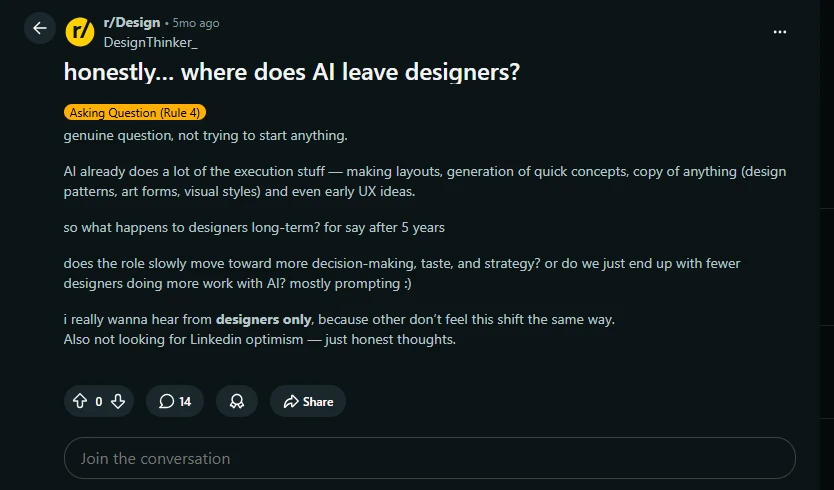
And honestly, that concern is valid.
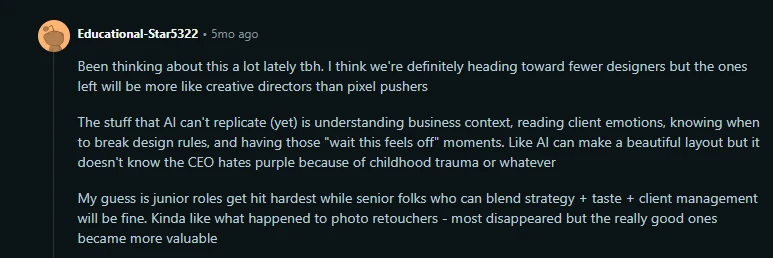
This comment explains the fear better than most reports do. The point is not that AI cannot make a clean layout. It can.
The point is that design work also includes business context, client emotions, taste, judgment, and knowing when something “feels off.”
That part is harder to automate. The commenter also makes a realistic prediction: junior designers and execution-heavy roles are likely to feel the pressure first. Senior designers who can combine strategy, taste, and client management may become more valuable.
That is a fair take. But it is still an opinion, not hard data.
So use this screenshot as a human voice from the design community. Not as proof.
The proof should come right after it, from the research data showing that AI-made designs can be more creative and unconventional, but not necessarily more useful, visually appealing, or brand-aligned.
So, AI is already good at execution-heavy work. But execution is not the full job.
A 2024 design study found that AI-supported designs were rated 13% more creative and 23.3% more unconventional. But they were not significantly better in usefulness, visual appeal, or brand alignment.
That is the problem. AI can make something look more interesting. But “interesting” does not mean effective.
Reliability is another issue. In the State of AI Design 2026 report, 62% of designers said inconsistent or unreliable output is their biggest challenge with AI tools. At the same time, 80% said reliable, high-quality output is what makes an AI tool stick.
There is also the same problem.
A PNAS Nexus study found that text-to-image AI increased creative productivity by 25% and artwork value by 50%. But it also found declines in average content and visual novelty, meaning AI can push creators toward more similar-looking work over time.
So AI does not fail because it cannot generate. It fails because it cannot reliably judge. That is still the designer’s job.
Yes, but only in a specific way. AI does not automatically make a UX designer more strategic, more tasteful, or better at understanding users.
It helps designers explore more options faster.
That matters because UX work is often limited by time. When designers can test more directions, compare more flows, draft more copy, and move through rough ideas faster, they get more room for the harder parts of the work: problem framing, structure, usability, accessibility, and judgment.
Adobe’s 2026 survey of more than 400 creative professionals and more than 400 marketers found that creative pros use AI on more than 40% of the projects they produce. Nearly 9 in 10 creatives said generative AI has made their work better.
Academic research also supports the productivity side, with one important caveat.
A PNAS Nexus study of more than 4 million artworks found that text-to-image AI increased creative productivity by 25% over time and increased artwork value by 50%, measured by favorite-per-view rate. This is strong evidence for AI-assisted creative production, but it is based on digital artwork, not UX design specifically.
So use this finding carefully.
It supports the idea that AI can help people produce and explore more creative options.
It does not prove that AI automatically improves UX quality.
At Musemind, this matches how we think about AI in UX design: AI is useful for widening the option space. It can help designers generate more flow ideas, copy variations, layout directions, and visual references. But the value comes from what the designer does next.
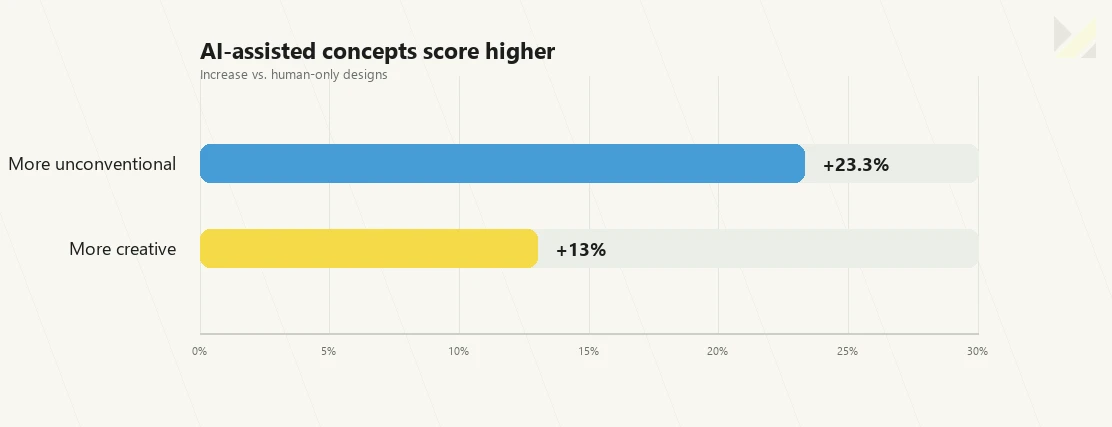
A 2024 arXiv preprint, which has not yet been peer reviewed, found that AI-supported designs were rated 13% more creative and 23.3% more unconventional than human-only designs. But those same AI-supported designs were not significantly better in usefulness, visual appeal, or brand alignment.
That is the practical warning for UX teams. AI can make work look more interesting. But interesting is not the same as usable. It can create a bold visual direction, but bold does not always reduce friction.
It can generate a surprising layout, but surprising does not always help users complete a task. It can produce 20 ideas, but most of them may still be wrong for the product.
There is also the same problem. The PNAS Nexus artwork study found that while AI improved productivity and value, average content and visual novelty declined. In plain English, AI can help people create more work, but it can also push outputs toward similar-looking patterns if designers do not actively challenge it.
So the answer is clear. AI can help UX designers explore more, can help them move faster, can make some outputs feel more creative.
But it does not replace taste, product strategy, research interpretation, usability thinking, or final judgment. AI gives UX designers more options. UX designers still have to know which option deserves to exist.
AI is not a superpower because it creates pretty images. That is the shallow version. For UX designers, the real superpower is cognitive leverage.
AI helps reduce the mental load of starting from zero, exploring more directions, and reaching better decisions faster. A SAGE study on early design processes tested 40 design students across two urban furniture design tasks. The AI-assisted group showed lower cognitive load and higher creativity scores compared with the non-AI group.
That matters in UX design. Because good UX is not just about effort.
It is about where the effort goes. If AI helps with early visual stimulus, rough concept generation, content drafts, interface ideas, and quick variations, the UX designer can spend more energy on user context, flow logic, accessibility, refinement, and decision-making.
At Musemind, this is how we think about AI-assisted UX work: automate the draft, not the decision. AI can help create options. The UX designer still owns the reasoning.
Good designers do not use AI to skip thinking. They use it to widen their thinking.
The SAGE study explains that AI-generated images can support abstraction and lateral thinking by giving students unexpected visual cues to interpret, break apart, and recontextualize.
That is useful because many designers get stuck inside familiar patterns. Same layout, same moodboard, same reference style, same safe direction.
AI can break that loop. Not because it has better taste. But because it can throw unexpected options into the process.
The Cambridge review analyzed 78 papers and mapped AI use across seven design disciplines, including product design, furniture design, artwork, graphic design, fashion, architecture, and UX/UI design. The table is useful because it shows AI is not just a “graphic design tool.” It is becoming a cross-discipline design assistant for ideation, visualization, iteration, and refinement.
So power is not a single tool. It is the workflow.
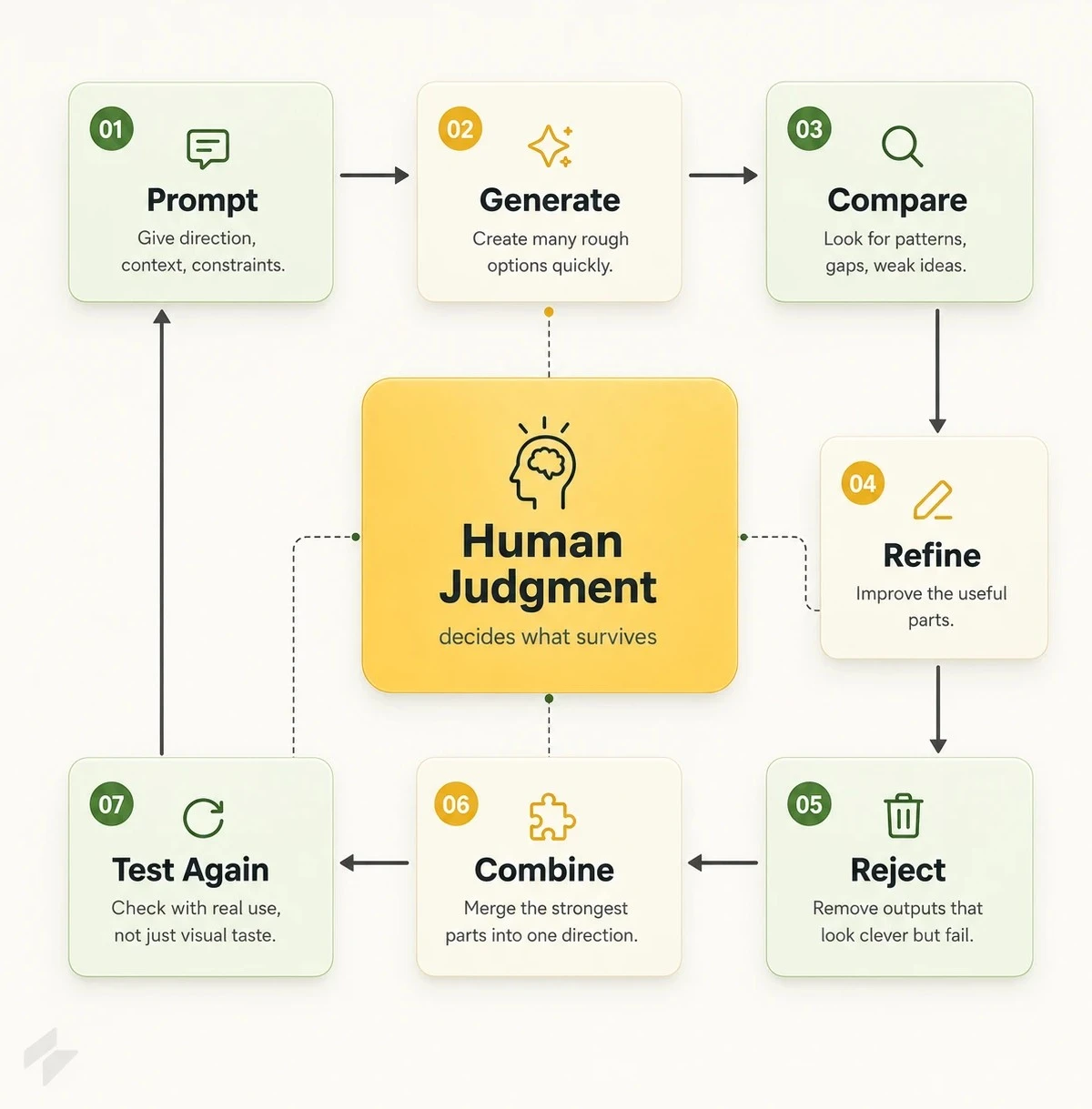
This is why AI is a superpower for good designers, not because one tool can replace their taste. But because AI gives them more raw material to think with.
The best UX designers are not the ones who create the most options. They are the ones who choose the right option. AI helps by giving designers more material to compare. More copy directions. More layout structures. More prototype ideas. More ways to test a flow before committing to one version.
But the final decision still needs UX judgment.
The Cambridge review found that AI can support decision-making by improving efficiency, flexibility, collaboration, and data-driven insight. But it also says designers still need to critically assess AI outputs to make sure they fit functional and creative requirements.
That is the line. AI can support decisions, and should not make the final decision.
A ScienceDirect systematic review on design thinking and AI also found that AI can reduce tedious processes, improve user-centricity, stimulate creativity, and support ideation, prototyping, and decision-making. But it warns that bias, privacy, and ethical concerns still need careful handling.
So AI gives UX designers more power, but it also gives them more responsibility.
A weak designer uses AI to produce more average work. A good UX designer uses AI to ask better questions, test more options, and make sharper calls.
That is why AI is a superpower only in the right hands. It does not replace the designer’s mind. It gives the designer more material to think with.
AI does not become a superpower just because a designer uses more tools.
That is the wrong way to think about it.
The real superpower is knowing which part of the UX workflow AI should support and which part still needs human judgment.
A Medium article on AI tools for designers frames this well: AI is becoming a co-pilot across the UX/UI workflow, from turning rough sketches into high-fidelity screens to synthesizing user research insights.
So the point is not “learn every AI tool.”
The point is to build the right AI-assisted skills.
The first superpower is turning rough ideas into interface directions quickly.
This means a UX designer can describe a screen, flow, dashboard, onboarding step, or feature idea and use AI to create an early interface direction.
Best-fit tools: Figma Make, Google Stitch, Uizard
Figma Make is useful because it can generate components, screens, and production-ready layouts from a prompt while working inside the design environment. It can also respect brand components, tokens, spacing, and styles.
Google Stitch is useful when designers need both visual UI and front-end code. It can turn text descriptions, rough sketches, or screenshots into polished interface designs and exportable HTML/CSS.
Uizard is useful for turning hand-drawn sketches or text ideas into editable UI layouts and clickable prototypes.
But the designer still owns the real decision. AI can create a screen. The UX designer decides whether that screen solves the right problem.
The second superpower is creating structure faster.
This is especially useful at the start of a project, when designers need quick sitemaps, wireframes, user flows, and page structures before jumping into high-fidelity design.
Best-fit tools: Relume AI, Uizard, Figma AI
Relume AI is useful because it can generate wireframes, sitemap structures, and placeholder content that respects hierarchy and UX logic.
That matters because early UX work is often repetitive. You are not always solving the final design problem yet. Sometimes you are just creating enough structure to discuss direction, compare options, and find what makes sense.
AI can speed that part up. But it cannot decide the information architecture for you. The UX designer still owns flow logic, content priority, hierarchy, and product structure.
The third superpower is faster research analysis.
UX is not just screens.
It is understanding users.
AI can help summarize interviews, usability tests, survey responses, reviews, and support tickets faster than manual analysis.
Best-fit tools: Maze AI, Claude, ChatGPT, Gemini
Maze AI is useful because it supports usability testing, highlights friction points, and provides improvement suggestions based on real user behavior. The Medium article describes it as a UX research assistant that summarizes trends much faster than manual analysis.
Claude, ChatGPT, and Gemini are useful for summarizing interview transcripts, grouping feedback themes, and turning messy notes into clearer research directions.
But this is where designers need to be careful.
AI can summarize what users say.
It cannot always understand what users meant.
The UX designer still needs to interpret behavior, find the real problem, and decide what feedback matters most.
The fourth superpower is moving closer to working products.
This does not mean every UX designer has to become a full engineer.
It means designers can now create more realistic prototypes, test ideas faster, and communicate better with developers.
Best-fit tools: Google Stitch, Figma Make, v0, Lovable, Cursor
Google Stitch is useful because it sits between design and development. It can generate visual UI and usable code from prompts, sketches, or screenshots.
Figma Make is useful for design-to-code workflows inside a familiar design environment. The article positions it as helpful for teams that want to stay in one ecosystem from sketch to final UI.
Tools like v0, Lovable, and Cursor are useful when designers want to create working demos, test product logic, or collaborate more deeply with engineers.
But again, code is not the whole UX.
The designer still owns usability, edge cases, interaction logic, accessibility, and whether the prototype actually supports the product goal.
The fifth superpower is faster iteration.
This is where AI becomes useful during the actual design sprint.
A designer can generate alternative layouts, rewrite UI copy, test different onboarding flows, create quick variations, or improve a prototype without starting from scratch every time.
Best-fit tools: Figma Make, Uizard, ChatGPT, Claude, Maze AI
AI is not replacing every UX designer. But it is putting pressure on a specific type of designer: The execution-only designer.
The designer who waits for instructions. The designer who can make a clean screen but cannot explain the product logic behind it.
The designer who depends on tools but lacks user understanding, taste, strategy, and judgment. That kind of designer is exposed.
Because AI can already make weak ideas look polished. A bad layout can look premium. A shallow concept can look finished. A weak UX direction can look impressive at first glance. But beautiful output does not mean good UX.
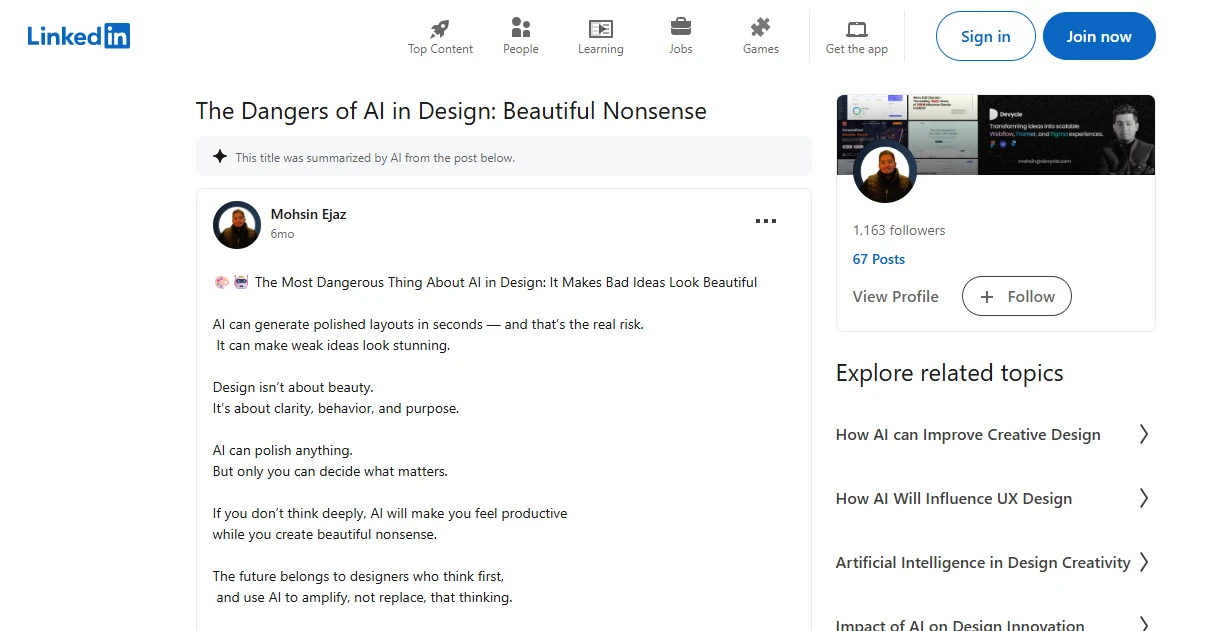
Matt Corrall makes a similar argument in his essay on AI art.
He explains that AI-generated images are built by breaking down huge datasets and recombining patterns from what already exists. His point is blunt: AI can produce striking results, but it does not understand context, intent, labor, or meaning the way a human creator does.
That matters for design. Because design is not just output.
It is not just pixels, not just “make this look nice.” Design is about purpose, clarity, behavior, constraints, and decision-making. A weak designer uses AI to skip that thinking, and a strong designer uses AI to challenge and improve that thinking.
Execution used to protect a lot of designers. Knowing the tool mattered, how to make a clean layout mattered, how to generate variations mattered.
Now, AI can do a lot of that faster, and that does not make designers useless. But it does make average execution less valuable. This is where weak designers get exposed. If your main value is making something look decent, AI is a threat. Because AI can already produce decent-looking work at speed.
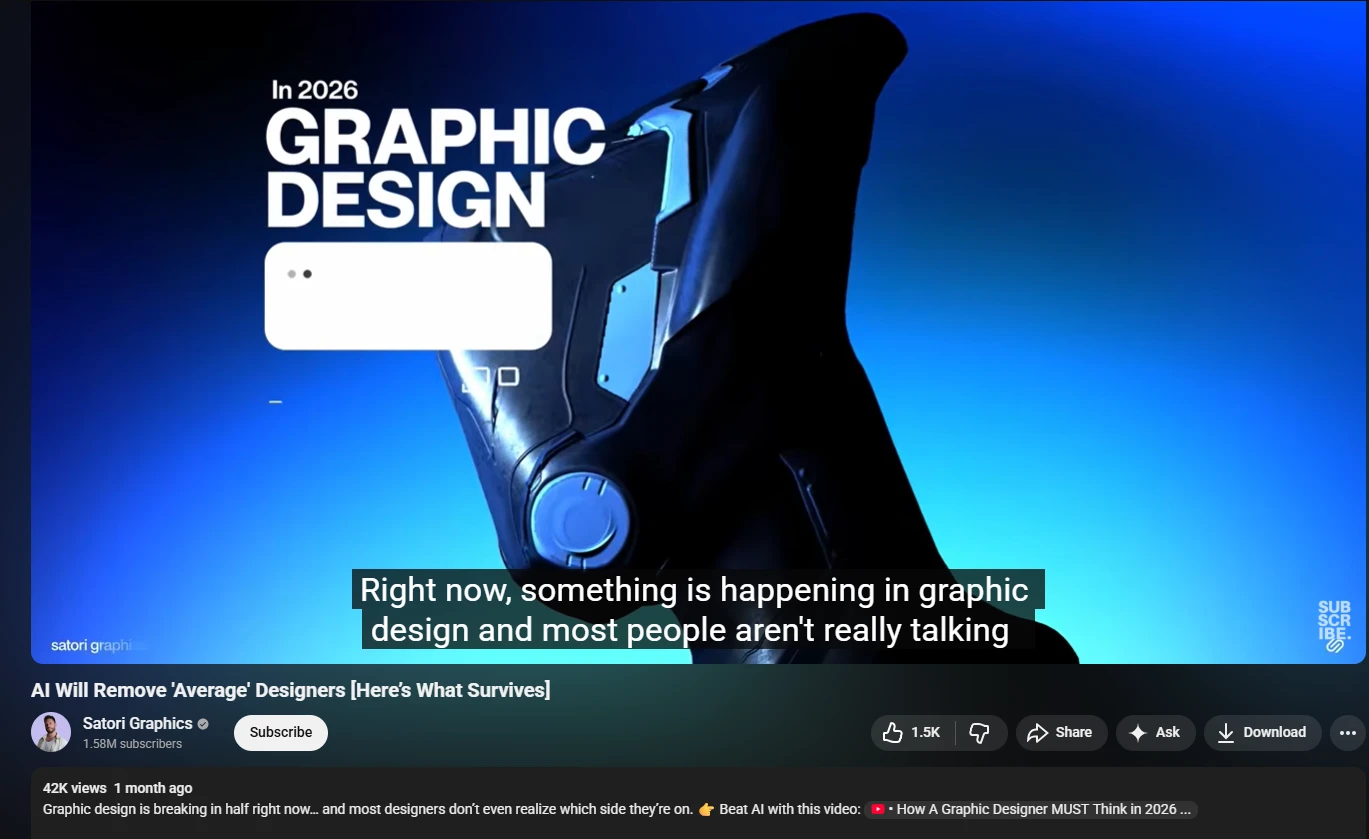
Many design educators and creators are saying the same thing: AI will remove a lot of average, execution-only design work. The designers who survive will be the ones who can think clearly, build taste, understand context, and use AI to amplify their decisions, not replace them.
But if your value is knowing what should be made, why it matters, and how it should perform, AI is less of a threat. It becomes leverage.
Corrall argues that AI art risks turning creative work into disposable “content” that can be produced instantly at scale. He also warns that automation can push skilled people out of the process and make creative labor more interchangeable.
That is harsh, but it is not wrong. This is already the pressure many designers feel. More output, more variations, more assets.
And, less time to think, less time to question the brief. Less time to understand the user, less time to develop a real point of view. That is how weak design happens.
Not because AI exists. But because teams use AI to produce more without asking whether the work is actually better.
A 2024 design study found that AI-supported designs were rated 13% more creative and 23.3% more unconventional than human-only designs. But they were not significantly better in usefulness, visual appeal, or brand alignment.
That is the key evidence.
AI can make something more interesting, but it cannot guarantee that it works. And this is exactly where weak designers fail.
They see polish and assume quality, see novelty and assume creativity, see speed and assume progress. But good designers know better.
The worst designer in the AI era is not the one who uses AI. That is not the issue.
The dangerous designer is the one who lets AI make the decision. They prompt once, accept the output, polish the surface, ship the result. That is how you get beautiful nonsense.
And this is why AI is dangerous for weak designers. It gives them confidence without depth. Speed without strategy, polish without purpose.
For good designers, AI is leverage. For weak designers, it is a shortcut to average work.
AI is already useful for ideation, wireframing, image generation, UI copy, research synthesis, design QA, accessibility checks, developer handoff, and front-end code. The strongest growth areas include code generation, wireframing, design systems, UI copy, design QA, and developer handoff, which means AI is moving beyond inspiration and into real production work. Source
AI can support UI/UX designers, but it cannot fully replace them. UX still depends on user context, usability judgment, accessibility, product tradeoffs, business goals, and real human behavior. AI can generate a wireframe or summarize research, but it does not automatically know whether a flow reduces friction, matches user intent, or solves the right product problem.
AI can replace some graphic design tasks, especially quick concepts, layout variations, image generation, social visuals, and template-based production work. But graphic design is not just making visuals. It also involves concept, typography, hierarchy, brand meaning, originality, and communication.
Yes, but only in a specific way. AI helps designers explore more ideas faster, generate more variations, and test more directions before choosing one. But more creative does not always mean better.
Designers need two skill sets: AI fluency and human judgment. AI fluency means knowing how to use AI for research, ideation, visuals, copy, prototyping, QA, and coding support. Human judgment means taste, strategy, storytelling, user understanding, typography, accessibility, brand thinking, product thinking, and communication.
No, prompt engineering is not enough. Prompting can help designers generate ideas and outputs faster, but a designer who can prompt without judging quality is still weak. AI can produce options, but designers need to know what to keep, what to remove, what to refine, and what to reject. The future is not just prompting. It is prompting plus design judgment.
Yes, junior designers are more exposed because many junior tasks are execution-heavy. Layout variations, basic UI copy, simple visuals, quick research summaries, and production tasks are easier for AI to support or automate. That does not mean juniors have no future. It means juniors need stronger fundamentals, better thinking, better communication, and faster learning because AI will make weak execution look replaceable.
Some design jobs will shrink, but not because design is disappearing. The work is changing. Simple execution tasks are becoming easier to automate, so designers who only produce basic visuals, layouts, or assets will feel more pressure. But designers who can think strategically, understand users, manage brand quality, work with AI, and connect design to business goals will still be valuable. The future is not fewer designers everywhere. There are fewer low-context designers and more hybrid, judgment-driven designers.
The biggest danger is beautiful nonsense. AI can make weak ideas look polished, generate impressive visuals without solving the real problem, and create more content without improving quality. So the danger is not just bad output. The danger is teams accepting polished output without enough thinking.
Designers should use AI for speed, exploration, and support, not final judgment. It is useful for generating ideas, summarizing research, testing copy, creating visual directions, building prototypes, and checking consistency. But before shipping anything, designers still need to ask whether the work solves the right problem, is clear, is useful, is accessible, is on-brand, is legally safe, and is actually better.
AI in UX design 2026 is not a replacement story. It is a separation story. AI is separating designers who only execute from designers who can think, judge, test, and guide product decisions.
The repetitive parts of design are becoming faster and cheaper. First drafts, UX design process, wireframes, UI copy, UX research or research phase, layout variations, and prototype ideas can now be created in minutes. That is a real shift, and pretending otherwise is pointless.
But UX design was never just about producing screens. It is about understanding users, shaping flows, reducing friction, protecting accessibility, making tradeoffs, and knowing what should actually ship.
That is where AI still needs human direction.
At Musemind, our view is simple: automate the draft, not the decision. Use AI to move faster, explore more options, and remove repetitive work. But keep UX designers responsible for user context, product logic, brand fit, usability, and final judgment.
So no, AI is not replacing strong UX designers. It is giving them more leverage.
But for execution-only designers, the warning is clear. The future does not belong to the designer who can only make things look good. It belongs to the designer who knows what good means.




A digital transformation agency bringing strategy, design, and development together to build useful digital products for ambitious businesses.